---
title: "WordPress SEO: How to Optimize Your WordPress Site"
description: Learn how to improve WordPress SEO, optimize your website, fix common issues, track results, and build a stronger SEO strategy with rankingCoach.
---
[](https://www.rankingcoach.com/en-us)
- [Features](https://www.rankingcoach.com/en-us/features?utm_source=rc_blog)
- [Pricing](https://www.rankingcoach.com/en-us/pricing?utm_source=rc_blog)
- [Partners](https://www.rankingcoach.com/en-us/partners?utm_source=rc_blog)
- [Blog](https://blog.rankingcoach.com/en)
- [English](https://go.rankingcoach.com/en/cms/seo-digital-marketing-wordpress)
- [Deutsch](https://go.rankingcoach.com/de/cms/seo-digital-marketing-wordpress)
- [Español](https://go.rankingcoach.com/es/cms/seo-digital-marketing-wordpress)
- [Français](https://go.rankingcoach.com/fr/cms/seo-digital-marketing-wordpress)
- [Italiano](https://go.rankingcoach.com/it/cms/seo-digital-marketing-wordpress)
- [Nederlands](https://go.rankingcoach.com/nl/cms/seo-digital-marketing-wordpress)
- [Polski](https://go.rankingcoach.com/pl/cms/seo-digital-marketing-wordpress)
- [Português](https://go.rankingcoach.com/pt/cms/seo-digital-marketing-wordpress)
English
Back
Close
- [Home](https://www.rankingcoach.com/en-us?utm_source=rc_blog)
- [Features](https://www.rankingcoach.com/en-us/features?utm_source=rc_blog)
- [Pricing](https://www.rankingcoach.com/en-us/pricing?utm_source=rc_blog)
- [Partners](https://www.rankingcoach.com/en-us/partners?utm_source=rc_blog)
- [Blog](https://blog.rankingcoach.com/en)
# WordPress SEO: A Practical Guide for Small Businesses

WordPress gives businesses a flexible foundation for building search-friendly websites, but effective SEO still requires the right configuration and an ongoing optimization strategy.
The platform already handles several important SEO fundamentals, including customizable URLs, XML sitemaps, headings, image alt text, and some canonical handling. Other areas, such as custom SEO titles and meta descriptions, redirects, advanced structured data, and more granular indexation controls, typically require additional configuration, a suitable theme, or WordPress SEO plugins.
This guide explains what WordPress already provides for SEO, what you still need to optimize, how to track your results, and how rankingCoach can help you turn that work into a clear, ongoing strategy.
## Table of Contents
1. [1. What Is WordPress?](https://go.rankingcoach.com/en/cms/seo-digital-marketing-wordpress#what-is-wordpress)
2. [2. WordPress SEO: Built-In Features and Limitations](https://go.rankingcoach.com/en/cms/seo-digital-marketing-wordpress#wordpress-seo-built-in-features-and-limitations)
3. [3. How to Do SEO on WordPress](https://go.rankingcoach.com/en/cms/seo-digital-marketing-wordpress#how-to-do-seo-on-wordpress)
4. [4. WordPress-Specific SEO Challenges](https://go.rankingcoach.com/en/cms/seo-digital-marketing-wordpress#wordpress-specific-seo-challenges)
5. [5. How to Track Your WordPress SEO Progress](https://go.rankingcoach.com/en/cms/seo-digital-marketing-wordpress#how-to-track-your-wordpress-seo-progress)
6. [6. How rankingCoach Helps WordPress Websites](https://go.rankingcoach.com/en/cms/seo-digital-marketing-wordpress#how-rankingcoach-helps-wordpress-websites)
7. [7. WordPress SEO: Frequently Asked Questions](https://go.rankingcoach.com/en/cms/seo-digital-marketing-wordpress#wordpress-seo-frequently-asked-questions)
8. [8. Improve Your WordPress SEO with rankingCoach](https://go.rankingcoach.com/en/cms/seo-digital-marketing-wordpress#improve-your-wordpress-seo-with-rankingcoach)
## 1. What Is WordPress?
WordPress is an open-source content management system (CMS) used to create everything from blogs and small business websites to large publishing sites and online stores.
There are two main ways you may encounter WordPress:
WordPress.org provides the open-source WordPress software that you install through a hosting provider or on your own server. This gives you extensive control over themes, plugins, website files, and configuration.
WordPress.com is a hosted service built around WordPress. Available functionality depends on the WordPress.com plan and setup you use.
This distinction matters for SEO because there is no single WordPress configuration. Your SEO capabilities and website performance can depend on your hosting environment, theme, plugins, content, and technical setup.
That flexibility is one of WordPress's greatest advantages, but it also means you need to understand which SEO features WordPress handles itself and which require additional configuration.
## 2. WordPress SEO: Built-In Features and Limitations
WordPress includes a useful SEO foundation, but it isn't an all-in-one SEO platform out of the box.
### Permalinks and SEO-Friendly URLs
WordPress lets you choose how URLs are structured through its permalink settings.
For most business websites, readable URLs based on the content or page name are easier for visitors to understand than URLs built around IDs or dates that aren't relevant to the content.
Once a website is established, however, changing its permalink structure requires care because existing URLs may already have backlinks, internal links, or search visibility.
### XML Sitemaps
Modern WordPress versions include XML sitemap functionality in WordPress core.
For public sites, WordPress automatically generates a sitemap index that helps search engines discover posts, pages, taxonomies, and other supported public content.
Plugins or custom development may still be useful when you need more control over exactly what appears in your sitemap.
### Headings
The WordPress editor supports headings from H1 through H6.
This gives you control over the hierarchy of your content, although the way headings are implemented can also depend on your theme or page builder.
Use headings to organize your content logically rather than simply to make text larger.
### Image Alt Text
WordPress lets you add alternative text to images through the Media Library and editor.
Use alt text to describe meaningful images for users who cannot see them. Avoid forcing keywords into alt text when they don't accurately describe the image.
### Search Engine Visibility and Indexing
WordPress includes a site-wide Search Engine Visibility setting under Settings \> Reading.
This can discourage search engines from indexing the website, which is useful during development but can cause serious visibility problems if accidentally left enabled when a website goes live.
More granular indexation decisions, such as controlling individual pages, archives, or content types, usually require additional configuration.
### Canonical URLs
WordPress core outputs canonical URLs for singular content such as individual posts and pages, helping search engines identify the preferred URL in common situations.
More complex websites may still require additional canonical configuration, particularly when plugins, filters, e-commerce functionality, or custom content structures create multiple URL variations.
### Responsive Design and Mobile Usability
WordPress itself doesn't guarantee that every website will be mobile-friendly. Much depends on the theme, page builder, custom code, plugins, and content you use.
Choose a responsive theme and test important pages on different screen sizes rather than assuming that WordPress automatically makes every implementation mobile-friendly.
### Content Organization and Internal Linking
WordPress provides pages, posts, categories, tags, menus, and other tools for organizing content.
These features can support a clear website structure, but they still need to be used strategically. Too many categories or tags can create unnecessary archive pages, while weak navigation and internal linking can make important content harder to discover.
### SEO Titles and Meta Descriptions
WordPress handles page titles, but core WordPress doesn't provide a comprehensive interface for creating custom SEO titles and meta descriptions for every page in the way dedicated SEO tools do.
This is one reason many businesses extend WordPress with additional SEO functionality.
### Redirects
WordPress handles some canonical redirects automatically, but it doesn't provide a comprehensive built-in dashboard for managing all your SEO redirects.
If you change or remove important URLs, make sure the old addresses redirect to the most relevant replacement where appropriate.
### Structured Data
Themes and WordPress functionality may output some structured information, but advanced schema implementation isn't a universal WordPress core feature that you can assume is configured correctly on every website.
The structured data available depends heavily on your theme, plugins, and website type.
### Open Graph and Social Metadata
WordPress core doesn't provide comprehensive Open Graph and social metadata management for every use case.
Themes, plugins, or other integrations commonly provide these controls.
### Advanced Crawl and Indexation Controls
WordPress provides a useful foundation, but granular controls for areas such as individual noindex directives, archive management, advanced robots rules, redirects, schema, and social metadata often require additional configuration.
This is where WordPress SEO plugins can be useful. The best SEO plugin for WordPress is not necessarily the one with the longest feature list, but the one that provides the functionality your website actually needs without creating unnecessary complexity or conflicts.
## 3. How to Do SEO on WordPress

Successful SEO optimization on WordPress starts with getting the technical foundation right and then continuously improving your content and search performance.
### Set an SEO-Friendly Permalink Structure
Go to Settings \> Permalinks and review how WordPress generates your URLs.
For many business and content websites, a clear structure based on the post or page name works well because the URL communicates what the content is about.
If your website is already established, don't change the permalink structure casually. Changing existing URLs can break internal links and backlinks unless redirects are handled correctly.
### Check Your Search Visibility Settings
Go to Settings \> Reading and check the Search Engine Visibility setting.
If your public website is ready to appear in search results, make sure you aren't unintentionally discouraging search engines from indexing it.
This is particularly important after moving a website from staging or development to a live domain.
### Optimize SEO Titles and Meta Descriptions
Important pages should have clear, descriptive SEO titles and meta descriptions that accurately represent their content.
Write them for potential visitors first. Relevant keywords can be included naturally, but avoid forcing keywords into every element or following rigid character-count formulas.
Because core WordPress has limited controls for custom SEO metadata, additional SEO functionality may be needed to manage this efficiently across your website.
### Create a Logical Heading Hierarchy
Use headings to organize each page into understandable sections.
The page's main topic should be immediately clear, while H2 and H3 headings can divide longer content into related sections and subsections.
Your theme may already generate certain headings, so check the rendered page rather than assuming that everything visible in the editor is implemented exactly as expected.
### Optimize Images and Alt Text
Large images can significantly affect WordPress performance.
- Resize them appropriately
- Compress unnecessarily large files
- Use efficient image formats where suitable
- Add descriptive alt text to meaningful images
- Avoid uploading much larger images than the page actually displays
WordPress supports native lazy loading for eligible images, but image size and the way your theme or plugins handle media can still affect performance.
### Build Internal Links
Connect related pages and posts with useful internal links.
Internal links help visitors discover additional information and help search engines understand the relationships between your pages.
Prioritize links that genuinely help the reader rather than adding large numbers of keyword-heavy links simply for SEO.
### Create Content Around Relevant Searches
Good SEO on WordPress depends heavily on content that matches what your potential customers are searching for.
Research topics around:
- Products and services
- Customer questions
- Problems your business solves
- Locations you serve
- Buying decisions
- Your specialist knowledge
Then match those searches with appropriate pages rather than trying to make every page target the same keywords.
Not sure which keywords or pages deserve your attention first?
**[Let rankingCoach help you build your SEO strategy →](https://www.rankingcoach.com/en-us/seo)**
### Manage Categories, Tags, and Archives Carefully
WordPress automatically creates archive pages for categories, tags, authors, dates, and other content structures depending on your setup.
These can be useful for navigation, but creating too many poorly differentiated archives can leave you with thin or repetitive pages.
Use categories and tags intentionally. Review whether archive pages provide genuine value and decide which ones should be available to search engines based on your website structure.
### Improve Site Speed and Core Web Vitals
WordPress performance varies significantly between websites.
Your hosting, theme, plugins, scripts, fonts, images, caching, and third-party integrations can all affect loading and responsiveness.
Regularly test important pages and investigate the specific elements causing performance problems rather than assuming that installing another optimization tool will automatically solve them.
### Check Mobile Usability
Test important pages on mobile devices.
- Navigation
- Text readability
- Buttons and forms
- Images and videos
- Pop-ups
- Layout shifts
- Page speed
A responsive theme is a good starting point, but individual pages can still develop mobile usability problems.
### Use HTTPS
Your website should use HTTPS so data exchanged between visitors and the site is encrypted.
Most modern hosting providers offer SSL certificates, but make sure your WordPress Address and Site Address use HTTPS and that old HTTP URLs redirect correctly.
### Check Your XML Sitemap
WordPress automatically provides an XML sitemap for public websites.
Check that your sitemap is accessible and that it contains the content you actually want search engines to discover. More complex websites may need additional control over sitemap content.
### Connect Google Search Console
Google Search Console helps you understand how Google crawls, indexes, and displays your website.
- Search queries
- Impressions
- Clicks
- Average positions
- Indexed pages
- Indexing problems
It is also useful when checking whether important new or updated pages are being discovered correctly.
How to connect your website to Google Search Console
### Use Appropriate Structured Data
Structured data can help search engines understand certain types of content more precisely.
The appropriate markup depends on the page. A local business, product, article, event, or other content type may require different structured data.
Before adding additional schema, check what your theme and existing plugins already generate to avoid conflicting or duplicate markup.
## 4. WordPress-Specific SEO Challenges
WordPress's flexibility creates advantages for SEO, but it can also create problems that are less common with more controlled website builders.
### Theme and Plugin Bloat
Adding plugins is easy, which can lead to WordPress sites accumulating functionality they no longer need.
Poorly optimized themes, excessive plugins, third-party scripts, and overlapping functionality can increase page weight and processing requirements.
Regularly review what your website actually uses and remove unnecessary functionality carefully.
### Poorly Configured Permalinks
WordPress gives you several permalink options, but not every structure is equally suitable for every website.
Choose a clear structure early. Changing established URLs later can create unnecessary redirect work and broken links if the migration is not handled correctly.
### Categories, Tags, and Archive Pages
WordPress can automatically generate many archive pages.
If categories and tags are created without a clear content strategy, you can end up with multiple archives containing very similar groups of posts or only one or two items.
Keep your taxonomy structure useful for visitors rather than creating tags for every variation of a keyword.
### Thin or Duplicate Content
WordPress itself doesn't automatically create a duplicate-content penalty, but its flexible content structure can produce multiple URLs or low-value archive pages when poorly configured.
Review what your site allows search engines to index and make deliberate decisions about pages, posts, archives, search results, and other generated content.
### Large and Unoptimized Images
WordPress makes uploading media simple, which can result in very large files being added directly from cameras, phones, or design software.
Even with WordPress built-in image handling, unnecessary file weight can affect page performance.
### Theme-Dependent Heading Structures
Your theme controls significant parts of your site's HTML.
A page that appears visually well structured can still contain an unclear heading hierarchy because of the way the theme, template, or page builder generates its markup.
Check important page templates as well as individual content.
### Theme and Plugin Conflicts
Multiple tools can sometimes attempt to control the same SEO element.
This can lead to duplicate metadata, conflicting structured data, unexpected redirects, or other technical issues.
Avoid installing overlapping functionality without understanding what each tool controls.
### WooCommerce SEO
WooCommerce adds products, categories, product attributes, filters, and other e-commerce functionality to WordPress.
For online stores, pay particular attention to product content, category structure, structured data, URLs, duplicate or filtered pages, internal linking, and site performance.
The exact requirements depend on the size and configuration of the store.
## 5. How to Track Your WordPress SEO Progress

SEO work is most useful when you can measure whether it is improving visibility, traffic, and business results.
### Google Search Console
Use Google Search Console to monitor how your WordPress website performs in Google Search.
- Clicks
- Impressions
- Search queries
- Average positions
- Landing pages
- Indexing
Don't overreact to normal daily fluctuations. Longer-term patterns usually provide more useful information.
### Google Analytics
Analytics helps you understand what happens after visitors reach your website.
Monitor organic traffic alongside meaningful business actions such as enquiries, purchases, registrations, calls, or other conversions relevant to your business.
Traffic growth alone does not tell you whether SEO is attracting the right audience.
### Keyword Rankings
Track the searches that are strategically important to your business.
Dedicated keyword monitoring can make it easier to see whether specific pages are gaining or losing visibility over time and whether your optimization work is having the intended effect.
### Competitor Monitoring
SEO performance does not happen in isolation.
Monitor businesses competing for the same searches to identify keyword opportunities, content gaps, backlinks, and changes in the competitive landscape.
Want a clearer view of your SEO progress and competitors?
**[Track your search visibility with rankingCoach →](https://www.rankingcoach.com/en-us/seo)**
### Local Visibility
If your WordPress website represents a local business, website SEO is only one part of your search presence.
Monitor your Google Business Profile and other relevant business listings to make sure customers can find accurate information about your business across local search platforms.
### Online Reputation
Reviews and online reputation can influence whether potential customers choose your business after discovering it.
Monitor new reviews, respond appropriately, and look for recurring feedback that could affect customer trust or your wider marketing strategy.
## 6. How rankingCoach Helps WordPress Websites
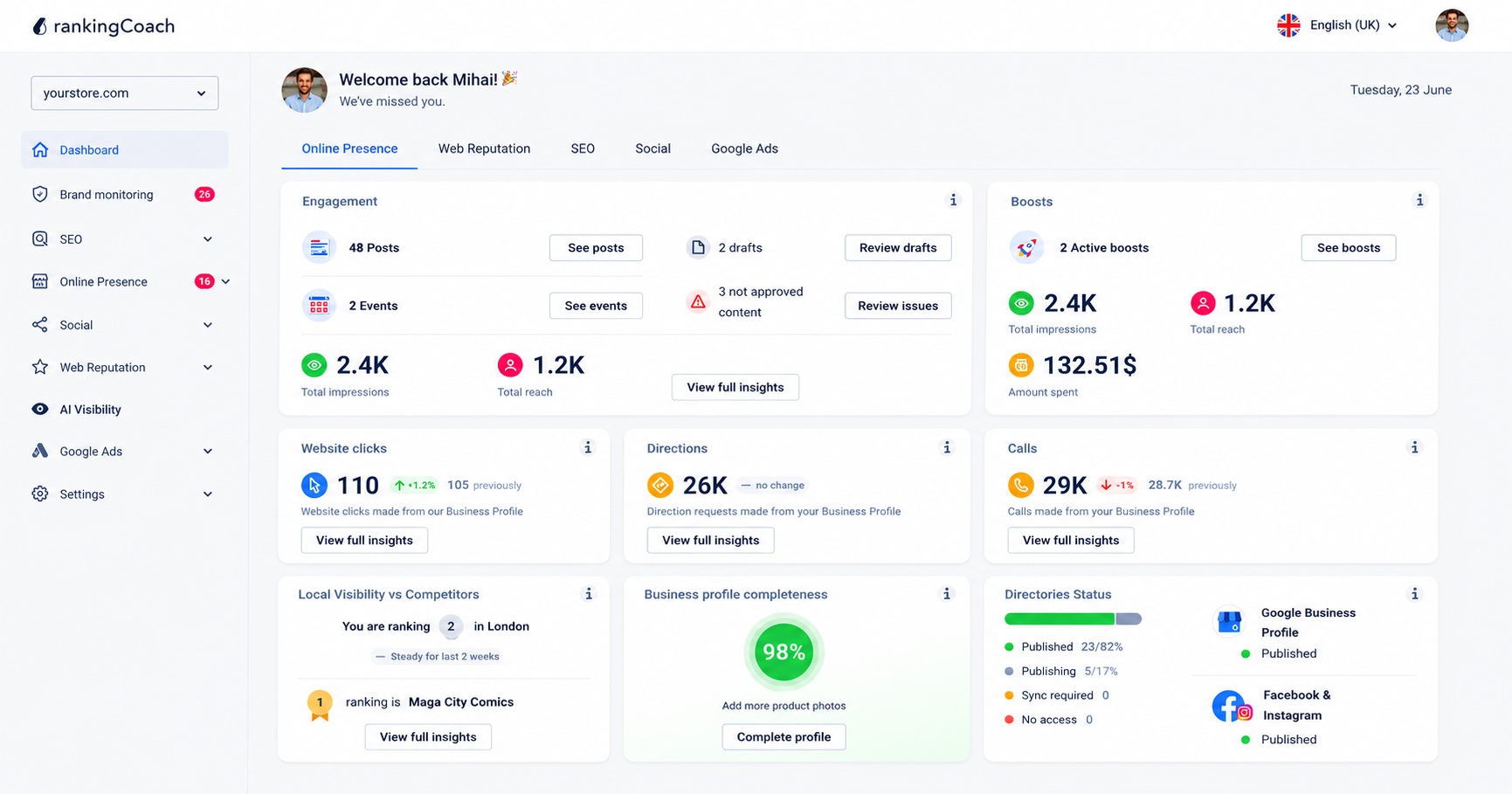
WordPress gives you the flexibility and foundation to build a search-friendly website. rankingCoach works alongside WordPress and other major CMSs and website builders, helping you understand what to optimize, prioritize the work, and track your progress.
During setup, select WordPress as your CMS so rankingCoach can tailor SEO tasks, written guidance, and tutorials to your website system.
Build and optimize your SEO with AI: rankingCoach analyzes your website and creates personalized optimization tasks. Use AI-powered keyword and content optimization to identify relevant opportunities, improve important page elements, and work through your SEO priorities.
Find issues and track progress: Scan your website for SEO opportunities, follow clear tasks, monitor keyword rankings, and use competitor and backlink insights to understand where you can improve.
Strengthen your Google and AI visibility: Track your search presence and understand how your business appears across traditional and AI-powered search as discovery continues to evolve.
Grow beyond website SEO: Connect SEO with your wider digital presence, including business listings and local visibility, reputation management, social media, Google Ads, and brand monitoring.
rankingCoach supports major Content Management Systems and website builders, so your optimization guidance can be adapted to the system you use rather than tying your SEO strategy to one platform.
From optimizing your WordPress content to monitoring competitors and managing your wider online presence, rankingCoach brings more of your digital marketing together in one place.
Ready to turn your WordPress SEO opportunities into action?
**[Improve your SEO with rankingCoach →](https://www.rankingcoach.com/en-us/seo)**
## 7. WordPress SEO: Frequently Asked Questions
**Is WordPress good for SEO?**
Yes. WordPress provides a flexible foundation for SEO, including customizable permalinks, XML sitemaps, headings, image alt text, content organization, and basic canonical handling. However, the SEO performance and functionality of a WordPress website also depend on its theme, plugins, hosting, content, and configuration.
**Does WordPress have SEO built in?**
WordPress includes several native SEO features, including customizable URLs, XML sitemaps, headings, image alt text, search-engine visibility settings, and canonical handling for common page types. More advanced functionality, such as custom SEO metadata, redirect management, structured data controls, and granular indexation settings, may require additional configuration or tools.
**How do I improve SEO on WordPress?**
Start with a clear permalink structure, check your indexing settings, optimize titles and descriptions, organize content with logical headings, improve internal links, optimize images, and create useful content around relevant searches. You should also monitor site speed, mobile usability, structured data, your XML sitemap, Google Search Console data, keyword rankings, and competitors.
**Do I need an SEO plugin for WordPress?**
Not necessarily for every SEO task. WordPress already provides several SEO fundamentals, including permalinks and XML sitemaps. However, WordPress SEO plugins can make it easier to manage areas such as custom SEO titles and descriptions, redirects, structured data, and advanced crawl or indexation settings. Choose additional functionality based on what your website actually needs.
**Does rankingCoach work with WordPress?**
Yes. rankingCoach works with WordPress and other major CMSs and website builders. Select WordPress as your CMS during setup so rankingCoach can provide tailored SEO tasks and guidance. It can analyze your website, help prioritize optimizations, track keyword rankings and competitors, and support your wider visibility across SEO, local listings, reputation, social media, Google Ads, brand monitoring, and AI search.
## 8. Improve Your WordPress SEO with rankingCoach
WordPress gives you extensive control over your website, but knowing what to optimize and where to focus your time can be more difficult. All major Content Management Systems (CMSs) are supported by rankingCoach, making your optimization plan the perfect fit for your system.
rankingCoach analyzes your website, identifies SEO opportunities, and turns them into prioritized tasks and guidance tailored to your CMS. You can optimize your content with AI, monitor keyword rankings and competitors, track your progress, and connect SEO with your wider online visibility.
Instead of treating SEO as a collection of individual WordPress settings, rankingCoach helps you turn it into a structured, ongoing strategy.
Ready to improve your WordPress SEO?
**[Get started with rankingCoach →](https://www.rankingcoach.com/en-us/seo)**
- - Features
- [Local Marketing](https://www.rankingcoach.com/en-us/local-marketing?utm_source=rc_blog)
- [Google Ads](https://www.rankingcoach.com/en-us/google-ads?utm_source=rc_blog)
- [Search Engine Optimization (SEO)](https://www.rankingcoach.com/en-us/seo?utm_source=rc_blog)
- [Reputation management](https://www.rankingcoach.com/en-us/local-marketing?utm_source=rc_blog)
- [Social Media Monitoring](https://www.rankingcoach.com/en-us/features?utm_source=rc_blog)
- [Brand Monitoring](https://www.rankingcoach.com/en-us/features?utm_source=rc_blog)
- - About
- [Legal Notice](https://www.rankingcoach.com/en-us/legal-notice?utm_source=rc_blog)
- [Terms and Conditions](https://www.rankingcoach.com/en-us/terms-and-conditions?utm_source=rc_blog)
- [Privacy Policy](https://www.rankingcoach.com/en-us/privacy-policy?utm_source=rc_blog)
- [Cancellation and Refund](https://www.rankingcoach.com/en-us/cancellation-refund-policy)
- [About Us](https://www.rankingcoach.com/en-us/about-us?utm_source=rc_blog)
- [Glossary](https://knowledge.rankingcoach.com/en)
- [Press](https://go.rankingcoach.com/en/pr)
- [Privacy & Cookie Settings](https://www.rankingcoach.com/en-us#)
- - Help
- [Help Center](https://help.rankingcoach.com/en?utm_source=rc_blog)
- [Contact](https://www.rankingcoach.com/en-us/contact?utm_source=rc_blog)
- Careers
- [We are hiring](https://www.linkedin.com/company/rankingcoach/jobs/?utm_source=rc_blog)
- - Digital Marketing Guides
- [Search Engine Marketing](https://www.rankingcoach.com/en-us/search-engine-marketing)
- [Search Engine Optimization](https://www.rankingcoach.com/en-us/search-engine-optimization)
- [Social Media Marketing](https://www.rankingcoach.com/en-us/social-media-marketing)
- [Email Marketing](https://www.rankingcoach.com/en-us/email-marketing)
- [User Experience (UX)](https://www.rankingcoach.com/en-us/user-experience-in-digital-marketing)
- [Review Management](https://www.rankingcoach.com/en-us/review-management)
- - rankingCoach is specially tailored for the following CMSs:
- [WordPress](https://go.rankingcoach.com/en/cms/seo-digital-marketing-wordpress)
- [Drupal](https://go.rankingcoach.com/en/cms/seo-digital-marketing-drupal)
- [Joomla 3.2](https://go.rankingcoach.com/en/cms/seo-digital-marketing-joomla)
- [Magento](https://go.rankingcoach.com/en/cms/seo-digital-marketing-magento)
- [Shopify](https://go.rankingcoach.com/en/cms/seo-digital-marketing-shopify)
- [Squarespace](https://go.rankingcoach.com/en/cms/seo-digital-marketing-squarespace)
- [Webs](https://go.rankingcoach.com/en/cms/seo-digital-marketing-webs)
- [Wix](https://go.rankingcoach.com/en/cms/seo-digital-marketing-wix)
- [Weebly](https://go.rankingcoach.com/en/cms/seo-digital-marketing-weebly)
- [Duda](https://go.rankingcoach.com/en/cms/seo-digital-marketing-duda)
- [PrestaShop 1.6](https://go.rankingcoach.com/en/cms/seo-digital-marketing-prestashop)
- [1&1 MyWebsite](https://go.rankingcoach.com/en/cms/seo-digital-marketing-11-mywebsite)
- [Jimdo](https://go.rankingcoach.com/en/cms/seo-digital-marketing-jimdo)
- [Opencart](https://go.rankingcoach.com/en/cms/seo-digital-marketing-opencart)

-
-
-
```json
{
"@context" : "https://schema.org",
"@type" : "VideoObject",
"contentUrl" : "https://8411010.fs1.hubspotusercontent-eu1.net/hubfs/8411010/video_assets/478109803717/inherited/web_optimized.mp4",
"dateModified" : "2026-09-24T13:13:57.811Z",
"description" : "Wordpress SEO tutorial: Learn how to connect your site to Google Search Console.",
"duration" : "PT1M8.733S",
"height" : 720,
"name" : "usa_wordpress_connect_website_search_console_new",
"thumbnailUrl" : "https://8411010.fs1.hubspotusercontent-eu1.net/hubfs/8411010/usa_wordpress_connect_website_search_console_new.mp4/medium.jpg",
"uploadDate" : "2026-09-24T13:08:36.669Z",
"width" : 1280
}
```
```json
{
"@context" : "https://schema.org",
"@type" : "FAQPage",
"mainEntity" : [ {
"@type" : "Question",
"acceptedAnswer" : {
"@type" : "Answer",
"text" : "Yes. WordPress provides a flexible foundation for SEO, including customizable permalinks, XML sitemaps, headings, image alt text, content organization, and basic canonical handling. However, the SEO performance and functionality of a WordPress website also depend on its theme, plugins, hosting, content, and configuration."
},
"name" : "Is WordPress good for SEO?"
}, {
"@type" : "Question",
"acceptedAnswer" : {
"@type" : "Answer",
"text" : "WordPress includes several native SEO features, including customizable URLs, XML sitemaps, headings, image alt text, search-engine visibility settings, and canonical handling for common page types. More advanced functionality, such as custom SEO metadata, redirect management, structured data controls, and granular indexation settings, may require additional configuration or tools."
},
"name" : "Does WordPress have SEO built in?"
}, {
"@type" : "Question",
"acceptedAnswer" : {
"@type" : "Answer",
"text" : "Start with a clear permalink structure, check your indexing settings, optimize titles and descriptions, organize content with logical headings, improve internal links, optimize images, and create useful content around relevant searches. You should also monitor site speed, mobile usability, structured data, your XML sitemap, Google Search Console data, keyword rankings, and competitors."
},
"name" : "How do I improve SEO on WordPress?"
}, {
"@type" : "Question",
"acceptedAnswer" : {
"@type" : "Answer",
"text" : "Not necessarily for every SEO task. WordPress already provides several SEO fundamentals, including permalinks and XML sitemaps. However, WordPress SEO plugins can make it easier to manage areas such as custom SEO titles and descriptions, redirects, structured data, and advanced crawl or indexation settings. Choose additional functionality based on what your website actually needs."
},
"name" : "Do I need an SEO plugin for WordPress?"
}, {
"@type" : "Question",
"acceptedAnswer" : {
"@type" : "Answer",
"text" : "Yes. rankingCoach works with WordPress and other major CMSs and website builders. Select WordPress as your CMS during setup so rankingCoach can provide tailored SEO tasks and guidance. It can analyze your website, help prioritize optimizations, track keyword rankings and competitors, and support your wider visibility across SEO, local listings, reputation, social media, Google Ads, brand monitoring, and AI search."
},
"name" : "Does rankingCoach work with WordPress?"
} ]
}
```
```json
{
"@context" : "https://schema.org",
"@type" : "SoftwareApplication",
"applicationCategory" : "BusinessApplication",
"name" : "rankingCoach",
"operatingSystem" : "Web"
}
```