
Jimdo SEO: A Practical Guide for Small Businesses

Jimdo makes it easy for small businesses and self-employed professionals to create a professional website without extensive technical knowledge. It also takes care of many SEO fundamentals automatically, giving you a solid starting point for improving your visibility in Google and other search engines.
But having a search-friendly website is only the beginning. To attract more potential customers, you still need to understand what they search for, optimize important pages, create useful content, monitor your rankings, and continuously improve your SEO strategy.
This guide explains what Jimdo already does for SEO, how to optimize your Jimdo website, how to measure your progress, and how rankingCoach can support your ongoing search strategy.
Table of Contents
- What Is Jimdo?
- Jimdo SEO: Built-In Features and Limitations
- How to Do SEO on Jimdo
- How to Track Your Jimdo SEO Progress
- How rankingCoach Helps Jimdo Websites
- Jimdo SEO: Frequently Asked Questions
- Get Started with rankingCoach
1. What Is Jimdo?
Jimdo is a website builder designed for entrepreneurs, freelancers, and small businesses that want to create and manage their own websites without coding.
Its guided website-building experience helps users create pages, add content, customize their design, and manage their online presence. Jimdo also includes AI-assisted functionality that can help with website creation, content, and business recommendations.
For SEO, one of Jimdo’s main advantages is simplicity. Several technical elements that would require manual configuration on a traditional CMS are handled automatically in the background.
Note: Jimdo also offers Jimdo (Creator), an alternative editor with more hands-on customization options. This guide focuses on the standard Jimdo website builder and its SEO capabilities for small businesses.
2. Jimdo SEO: Built-In Features and Limitations
Jimdo provides a strong technical starting point for SEO and automatically manages many elements that small business owners might otherwise need to configure themselves.
SEO Titles and Descriptions
Jimdo lets you optimize important information that helps search engines understand your website, including your homepage title, website title, and website description.
Jimdo also automatically optimizes meta titles for subpages, reducing the amount of manual SEO configuration required.
Write titles and descriptions that clearly explain what your business and pages are about. Include relevant keywords where they fit naturally, but prioritize usefulness and readability.
Headings and Page Structure
A clear heading structure helps organize your content for visitors and search engines.
Use one main heading to communicate the primary topic of a page, then organize supporting information with appropriate subheadings. Headings should describe the content that follows rather than simply repeat target keywords.
Jimdo SEO tutorial: How to optimize headings on a Jimdo page
Image Alt Text
Jimdo lets you add alternative text to images.
Alt text improves accessibility by describing visual content and can also give search engines additional context about an image.
Keep it specific and descriptive. Include a relevant keyword only when it accurately describes the image.
Automatic Technical SEO
One of Jimdo’s strengths is how much technical SEO it handles automatically.
This includes areas such as:
- Responsive design
- Website performance optimization
- XML sitemap creation and maintenance
- robots.txt
- URLs and redirects
- A customizable 404 page
For small businesses without technical SEO expertise, this removes a considerable amount of configuration and maintenance.
AI-Assisted Website and Content Creation
Jimdo has also expanded its AI capabilities.
Its AI-powered functionality can assist with website and content creation, while Jimdo Companion can analyze information about your website and business and provide recommendations.
These tools can make website management and content creation faster, but AI-generated suggestions should still be reviewed carefully. Your content needs to accurately represent your business, expertise, services, and customers.
Where Jimdo SEO Becomes More Limited

Jimdo’s automated approach makes SEO more accessible, but it also means you have less granular control over certain advanced technical elements than you would with a more developer-focused CMS.
More importantly, having SEO settings available doesn’t automatically give you an SEO strategy.
You still need to determine:
- Which keywords potential customers use
- Which pages should be optimized first
- Which new content could create search opportunities
- How your Google rankings change
- How competitors perform for important searches
- Whether your SEO work is improving your visibility
This is where SEO moves beyond configuring your Jimdo website and becomes an ongoing process.
3. How to Do SEO on Jimdo
Because Jimdo handles much of the technical foundation, you can focus primarily on keywords, content, website structure, and continuous optimization.
Start With Keyword Research
Before optimizing a page, find out what potential customers actually search for. The best keywords aren’t necessarily those with the highest search volume. They should also be relevant to your business and match the purpose of the page.
For example, a local photographer is likely to benefit more from searches around specific photography services and locations than from trying to rank for a very broad term such as “photography.”
Look for keywords around:
- Your products and services
- Your location
- Customer problems and needs
- Frequently asked questions
- Specific purchase intentions
- Topics related to your expertise
Then match relevant keywords with individual pages rather than targeting the same keyword everywhere.
Not sure which keywords or pages to prioritize?
Let rankingCoach guide your next SEO steps →
Optimize Important Pages Around a Clear Topic
Each important page should have a specific purpose.
Your homepage can introduce your overall business, while individual service, product, or informational pages should focus on more specific topics.
Make the subject of each page clear through its:
- Main heading
- Subheadings
- Body content
- Images and alt text
- Internal links
- Available SEO title and description settings
Use keywords naturally. Repeating the same phrase unnecessarily won’t make the page more useful to visitors.
Jimdo SEO tutorial: How to edit the meta description of a Jimdo page
Create Content Around Customer Questions
SEO can also help you reach people before they are ready to buy. Think about the questions customers ask before contacting your business or purchasing something. These can become useful topics for new website content.
Depending on your business, that might include:
- How-to articles
- Service explanations
- Buying guides
- Frequently asked questions
- Comparisons
- Local information
- Advice based on your expertise
The goal isn’t simply to publish more pages. Each piece of content should answer a genuine question or help a potential customer make a decision.
Build a Clear Website Structure
Keep important pages easy to find through your navigation and link related pages together where appropriate.
For example, an article explaining how to choose a particular service could link naturally to the corresponding service page.
Internal links help visitors discover additional information while also showing search engines how your pages relate to one another.
Optimize Your Images
Use useful, high-quality images without making the files unnecessarily large.
Add descriptive alt text where appropriate and make sure each image contributes something meaningful to the page.
This can be particularly important for visual and local businesses such as photographers, restaurants, retailers, salons, accommodation providers, and tradespeople.
Keep Improving Existing Content
SEO doesn’t end when your Jimdo website goes live.
Review important pages periodically. Update outdated information, strengthen pages that aren’t performing as expected, expand useful content, and look for new customer questions you can answer.
A well-maintained existing page can sometimes be a better opportunity than creating another page from scratch.
4. How to Track Your Jimdo SEO Progress

SEO decisions become much more useful when they’re based on performance data.
Use Google Search Console
Google Search Console helps you understand how your Jimdo website performs in Google Search.
You can use it to monitor:
- Search impressions
- Clicks
- Queries bringing visitors to your site
- Average search positions
- Indexing
- Sitemap information
Focus on longer-term trends rather than reacting to normal daily ranking fluctuations.
For example, if a page receives many impressions but relatively few clicks, its search result may not be attracting enough attention. A page consistently appearing close to stronger positions may be worth further optimization.
Monitor Website Traffic
Jimdo provides website statistics, and analytics tools can give you additional insight into what visitors do after reaching your website.
Don’t look only at total traffic. Consider which pages attract visitors, where those visitors come from, and whether they take meaningful actions once they arrive.
Track Important Keyword Rankings
Google Search Console provides valuable search-performance data, but dedicated keyword tracking lets you follow strategically important searches more consistently.
Monitoring your target keywords over time makes it easier to identify:
- Ranking improvements
- Ranking losses
- Pages gaining visibility
- Keywords that need additional work
- New opportunities
Avoid manually searching Google for your keywords as your main tracking method. Search results can vary based on factors such as location and personalization.
Monitor Competitors
Your own rankings only tell part of the story.
Competitor monitoring helps you understand who you’re competing with in search and where other businesses may be outperforming you.
This gives your ranking data more context and can reveal keyword or content opportunities you haven’t considered yet.
5. How rankingCoach Helps Jimdo Websites
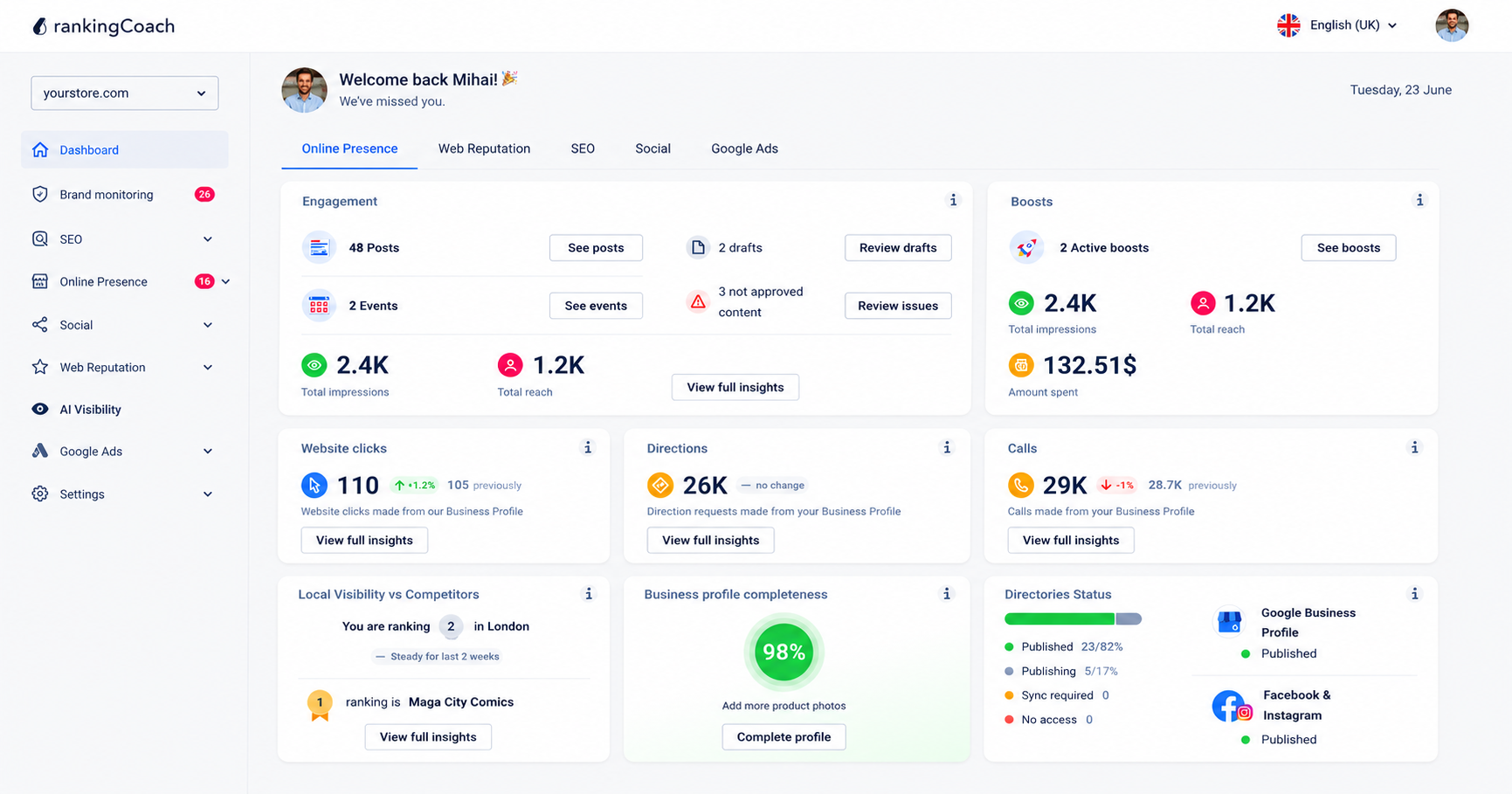
Jimdo provides a solid SEO foundation and handles many technical elements automatically. rankingCoach complements these capabilities by helping you decide what to work on, monitor your progress, and manage your wider online visibility.
To get started, create or sign in to your rankingCoach account and follow the onboarding process. rankingCoach analyzes your website and identifies opportunities based on your business and website.
- Get a personalized SEO action plan: Turn identified SEO opportunities into actionable tasks, helping you understand what to optimize and what to prioritize next.
- Find relevant keywords: Identify keyword opportunities that match your business and use them to guide your website and content optimization.
- Track keyword rankings: Monitor how your website performs for important searches over time and identify improvements, declines, and opportunities that need attention.
- Keep an eye on competitors: Compare your search performance with competitors to understand where they are stronger and uncover opportunities for your own website.
- Strengthen your presence beyond your website: Depending on your plan, manage additional areas of your digital presence, including business listings, reviews and reputation, social media, Google Ads, brand monitoring, and AI Visibility.
- Work across different website platforms: All major Content Management Systems (CMSs) are supported by rankingCoach, making your optimization plan the perfect fit for your system.
Ready to turn your Jimdo SEO insights into action?
See how rankingCoach can help you improve your search visibility →
6. Jimdo SEO: Frequently Asked Questions
Is Jimdo good for SEO?
Yes. Jimdo provides a solid SEO foundation for small business websites and automatically handles several technical elements, including responsive design, website performance, sitemaps, robots.txt, URLs, and redirects. It also provides tools for optimizing important website information and content. However, achieving strong search visibility still depends on your keyword strategy, content quality, competition, and ongoing optimization.
Does Jimdo have built-in SEO tools?
Yes. Jimdo includes built-in SEO functionality and automatically manages several technical SEO elements. You can also optimize important website information, headings, images, and content. Some advanced controls are more automated than they would be in a developer-focused CMS.
Can I use Google Search Console with Jimdo?
Yes. You can use Google Search Console to monitor how your Jimdo website performs in Google Search, including clicks, impressions, search queries, indexing information, and other search-performance data.
Does rankingCoach work with Jimdo?
Yes. All major Content Management Systems (CMSs) are supported by rankingCoach, making your optimization plan the perfect fit for your system. Create or sign in to your rankingCoach account and follow the onboarding process. rankingCoach analyzes your website and provides personalized SEO tasks and guidance to help you improve your search visibility.
What can rankingCoach add to Jimdo’s built-in SEO tools?
Jimdo provides the foundation for optimizing your website, while rankingCoach helps you turn SEO into an ongoing strategy. It can help you identify and prioritize SEO opportunities, find relevant keywords, monitor rankings and competitors, and, depending on your plan, manage additional areas of your digital presence from one platform.
7. Get Started with rankingCoach
Jimdo gives small businesses a strong starting point for SEO by handling many technical fundamentals automatically and providing straightforward tools for optimizing website content.
The next step is turning that foundation into an ongoing strategy.
rankingCoach analyzes your website, identifies SEO opportunities, and helps you understand what to prioritize next. You can monitor keyword rankings and competitors while expanding your strategy beyond your website into other areas of your online presence.
All major Content Management Systems (CMSs) are supported by rankingCoach, making your optimization plan the perfect fit for your system.
There is no rankingCoach plugin or app you need to install in Jimdo. Create or sign in to your rankingCoach account and follow the onboarding process to get started. Ready to take the next step with your SEO?