---
title: "Weebly SEO: A Practical Guide for Small Businesses"
description: Learn how to improve your Weebly site SEO. What the platform covers, where the gaps are, and how rankingCoach helps you rank higher.
---
[](https://www.rankingcoach.com/en-us)
- [Features](https://www.rankingcoach.com/en-us/features?utm_source=rc_blog)
- [Pricing](https://www.rankingcoach.com/en-us/pricing?utm_source=rc_blog)
- [Partners](https://www.rankingcoach.com/en-us/partners?utm_source=rc_blog)
- [Blog](https://blog.rankingcoach.com/en)
- [English](https://go.rankingcoach.com/en/cms/seo-digital-marketing-weebly)
- [Deutsch](https://go.rankingcoach.com/de/cms/seo-digital-marketing-weebly)
- [Español](https://go.rankingcoach.com/es/cms/seo-digital-marketing-weebly)
- [Français](https://go.rankingcoach.com/fr/cms/seo-digital-marketing-weebly)
- [Italiano](https://go.rankingcoach.com/it/cms/seo-digital-marketing-weebly)
- [Nederlands](https://go.rankingcoach.com/nl/cms/seo-digital-marketing-weebly)
- [Polski](https://go.rankingcoach.com/pl/cms/seo-digital-marketing-weebly)
- [Português](https://go.rankingcoach.com/pt/cms/seo-digital-marketing-weebly)
English
Back
Close
- [Home](https://www.rankingcoach.com/en-us?utm_source=rc_blog)
- [Features](https://www.rankingcoach.com/en-us/features?utm_source=rc_blog)
- [Pricing](https://www.rankingcoach.com/en-us/pricing?utm_source=rc_blog)
- [Partners](https://www.rankingcoach.com/en-us/partners?utm_source=rc_blog)
- [Blog](https://blog.rankingcoach.com/en)
# Weebly SEO: A Practical Guide for Small Businesses

Weebly SEO starts with what the platform provides out of the box, but ranking your site in search takes more than the built-in settings deliver. The drag-and-drop editor handles hosting, SSL, and mobile responsiveness with no technical setup required. The platform covers some SEO basics automatically, and it has real gaps around heading structure, schema markup, and keyword visibility that hold many sites back.
Most Weebly users look for answers to weebly search engine optimization questions and find advice focused on meta fields or URL slugs. These matter, but they are only the starting point. Knowing where you rank, how competitors are performing, and whether your business appears consistently across directories is what drives sustainable growth.
## Table of Contents
1. [What Is Weebly?](https://go.rankingcoach.com/en/cms/seo-digital-marketing-weebly#what-is-weebly)
2. [Weebly SEO: Built-In Features and Limitations](https://go.rankingcoach.com/en/cms/seo-digital-marketing-weebly#weebly-seo-built-in-features-and-limitations)
3. [How to Do SEO on Weebly](https://go.rankingcoach.com/en/cms/seo-digital-marketing-weebly#how-to-do-seo-on-weebly)
4. [How to Track Your SEO Progress on Weebly](https://go.rankingcoach.com/en/cms/seo-digital-marketing-weebly#how-to-track-your-seo-progress-on-weebly)
5. [How rankingCoach Helps with Weebly SEO](https://go.rankingcoach.com/en/cms/seo-digital-marketing-weebly#how-rankingcoach-helps-with-weebly-seo)
6. [Weebly SEO: Frequently Asked Questions](https://go.rankingcoach.com/en/cms/seo-digital-marketing-weebly#weebly-seo-frequently-asked-questions)
7. [Get Started with rankingCoach](https://go.rankingcoach.com/en/cms/seo-digital-marketing-weebly#get-started-with-rankingcoach)
## 1. What Is Weebly?
Weebly is a drag-and-drop website builder designed for users who want to build a website without writing code. It offers responsive templates, built-in hosting, a free SSL certificate, and a simple editor that lets you add pages, blog posts, and product listings with minimal technical knowledge. Weebly is owned by Block (formerly Square) and primarily serves small businesses, local service providers, and individuals building portfolio or informational sites.
The platform sits alongside Square Online, which is focused on more advanced e-commerce stores. Weebly is better suited to service businesses, local companies, and content sites that need a straightforward, manageable web presence.
For SEO, Weebly covers several basics: you can set page titles, meta descriptions, image alt text, and custom URLs for each page. The platform generates an XML sitemap automatically and provides free SSL on all plans. Where it falls short is in more advanced SEO controls, including heading tag hierarchy, native schema markup, and keyword rank tracking.
## 2. Weebly SEO: Built-In Features and Limitations
Weebly provides most of the tools needed to establish the basic SEO foundations of a small website. Some features work automatically, while others can be managed through individual page settings.
### What Weebly includes natively
- **SSL certificate:** HTTPS is enabled without requiring separate technical configuration.
- **Mobile-responsive templates:** Weebly templates are designed to adapt to different screen sizes.
- **XML sitemap:** Weebly automatically generates a sitemap for your website.
- **Page titles and meta descriptions:** These can be customized for individual pages.
- **Custom URLs:** Page URLs can be edited to make them shorter and more descriptive.
- **Image alt text:** You can add descriptive alternative text to images.
### Where Weebly falls short

### Limited heading structure control
Weebly provides less granular control over heading structure than some CMS platforms. How heading elements are output can also depend on your theme, which can make it harder to manage a precise H1–H6 hierarchy across your pages.
### No native schema markup
Weebly does not include a built-in interface for adding schema markup. If you want to add structured data for products, local businesses, events, or other content, you need to insert the code manually through Weebly's code injection options.
### Limited robots.txt control
Weebly automatically manages your robots.txt file and does not provide a built-in editor for directly customizing it. You can, however, hide your entire website or individual pages from search engines through Weebly’s search visibility settings. More advanced crawl-control requirements may therefore require additional work.
### No built-in keyword rank tracking
Weebly's analytics can tell you about activity on your website, but they do not track where your pages rank for individual keywords. To measure your organic search visibility and keyword movement over time, you need an external SEO tool.
## 3. How to Do SEO on Weebly

Despite these limitations, there is plenty you can do directly in Weebly to improve your site's SEO. Start with the elements you can control and make sure the fundamentals are in place across your most important pages.
### Set meta titles and descriptions for every page
Open each page in Weebly and go to its SEO settings. Give every important page a unique title and meta description that accurately describe its content and naturally include the primary keyword you want the page to target. Keep your meta titles concise, ideally under 60 characters, and your descriptions under approximately 155 characters. Start with your homepage and main service or product pages before working through the rest of your site.
How to edit the meta description of a Weebly page
### Focus on meta titles and descriptions, not meta keywords
If you are looking for the Weebly meta keywords setting, you can safely stop. Meta keywords are no longer used by Google as a ranking factor. Instead, use your target keywords naturally in your page title, meta description, headings, copy, image alt text, and other relevant page elements. Avoid forcing keywords into places where they do not help the reader.
### Optimize your page URLs
Weebly allows you to customize URLs for individual pages. Keep them short, descriptive, and easy to understand. For example, /plumbing-services is clearer than a long URL copied from the full page title. Use lowercase words separated by hyphens and avoid unnecessary numbers or parameters.
### Add alt text to your images
Add descriptive alt text to important images so search engines and screen readers can understand what they show. Describe the image accurately and include a relevant keyword only when it fits naturally.
### Connect Google Search Console
Connect your website to Google Search Console to see how it performs in Google Search. You can monitor queries, impressions, clicks, indexing issues, and other organic search data that Weebly's own analytics do not provide. Weebly generates an XML sitemap automatically. Submit this sitemap through Search Console to help Google discover and crawl your pages.
How to submit XML sitemap in Google Search Console
### Build internal links
Link related pages together so visitors and search engines can navigate your site more easily. For example, a blog article about one of your services can link to the corresponding service page. Prioritize links to your most important pages and use descriptive anchor text that makes it clear what users will find after clicking.
## 4. How to Track Your SEO Progress on Weebly
Weebly includes basic site analytics, but it does not show keyword rankings, search impressions, or how your pages are performing in organic search. To understand what is driving traffic to your site, you need external tools.
### Google Search Console
Connect your website to Search Console, then submit your auto-generated sitemap through the Sitemaps section. This gives you data on which search queries bring impressions and clicks to your pages, which pages are indexed, and any crawl errors. Search Console does not show historical rank positions or competitor data.
### Google Analytics
Use Google Analytics to understand what visitors do after reaching your site. Monitor organic landing pages, engagement, and conversions to see whether increased search visibility is bringing in visitors who actually take action.
### Keyword rankings
Search Console provides average position data, but dedicated rank tracking makes it easier to follow individual target keywords consistently over time. Track important service and category searches and focus on longer-term movement rather than individual daily fluctuations.
### Competitor performance
Your own traffic and ranking data only show part of the picture. Monitoring competing sites can help reveal keywords and opportunities you are currently missing.
rankingCoach picks up where Search Console stops. It tracks your Weebly site's rankings weekly, shows you which pages are gaining or losing ground, and generates a prioritized task list so you always know what to work on next.
**[Explore keyword rank tracking with rankingCoach →](https://www.rankingcoach.com/en-us/seo)**
## 5. How rankingCoach Helps with Weebly SEO
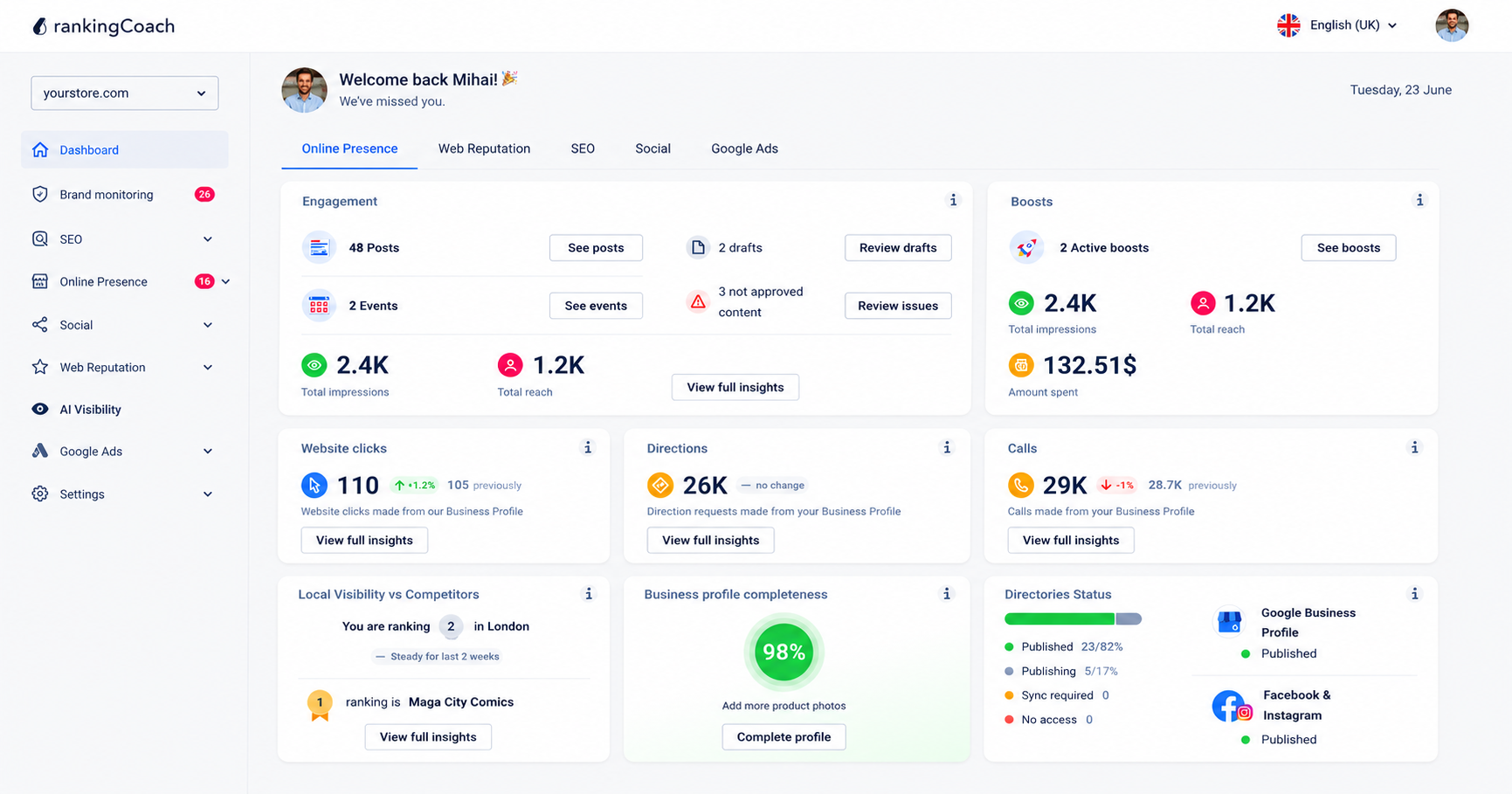
Growing your Weebly site visibility takes more than setting up meta fields and connecting Search Console. You need to know where you rank, what competitors are doing, and whether your business appears consistently across every place customers search. rankingCoach brings all of that into one platform, working alongside your Weebly site without any installation in your admin.
All major Content Management Systems (CMSs) are supported by rankingCoach, making your optimization plan the perfect fit for your system. To get started, create or sign in to your rankingCoach account and follow the onboarding process.
Selecting Weebly during onboarding tailors the SEO task instructions and video tutorials to the platform. rankingCoach analyzes your site, identifies keyword opportunities, and generates a prioritized list of SEO tasks, each with written instructions and video tutorials adapted to Weebly. You always know what to work on next, without needing an SEO agency or developer.
Beyond SEO, rankingCoach manages every other channel that affects your online presence. It syncs your business information across 30+ directories, monitors reviews from across the web, and helps you respond quickly. Social media publishing, Google Ads workflows, brand monitoring, and AI Visibility are all in the same dashboard.
### Key features for Weebly users
- **Keyword rank tracking:** Monitor where your Weebly site ranks for your target keywords and track movement over time.
- **Competitor monitoring:** See how your site compares to competitors in search results and identify keywords they rank for that you do not.
- **Business listings management:** Keep your details accurate and consistent across Google, Bing, Facebook, and 30+ directories automatically.
- **Review and reputation management:** Monitor reviews across platforms and respond quickly with AI-assisted reply suggestions.
- **Social media and Google Ads:** Publish social media content, schedule posts, and manage Google Ads campaigns from one dashboard.
- **AI Visibility:** See how AI-powered search platforms like ChatGPT, Perplexity, and Gemini represent your business and where visibility gaps exist.
- **AI Agent:** Automate routine SEO and marketing tasks across every channel so your site keeps improving without manual effort.
**[See how rankingCoach brings it all together →](https://www.rankingcoach.com/en-us/features)**
## 6. Weebly SEO: Frequently Asked Questions
**Does Weebly have good SEO?**
Weebly includes basic SEO settings such as page titles, meta descriptions, alt text for images, and clean URL structures. These cover the fundamentals, but they leave a gap when it comes to monitoring your rankings, tracking competitors, and knowing which changes will actually move the needle. Tools like rankingCoach fill that gap by giving you ongoing keyword tracking, competitor monitoring, and a prioritized action list so you can keep improving your visibility over time.
**Can I add meta keywords to Weebly?**
Meta keywords are not used by Google as a ranking factor, so there is little SEO value in spending time on them. Instead, optimize your page titles and write clear, relevant meta descriptions. Page titles can help search engines understand your content, while meta descriptions can influence how your pages are presented in search results and encourage users to click.
**Does rankingCoach work with Weebly?**
Yes. All major Content Management Systems (CMSs) are supported by rankingCoach, making your optimization plan the perfect fit for your system. Simply select Weebly as your website platform during onboarding, and rankingCoach adapts its SEO instructions and video tutorials to the platform.
**What does rankingCoach do for Weebly SEO?**
rankingCoach analyzes your website, tracks your keyword rankings, identifies SEO opportunities, and turns them into a prioritized list of tasks. Each task includes step-by-step instructions and video tutorials tailored to Weebly, helping you understand what to optimize and what to work on next.
**Is rankingCoach free for Weebly users?**
Yes. rankingCoach offers a free plan that includes core SEO tracking and visibility tools. Paid plans unlock advanced AI automation, expanded listings coverage, and additional marketing features. You do not need a plugin or app to get started.
## 7. Get Started with rankingCoach
rankingCoach helps you take the next step beyond basic Weebly SEO tools. It tracks your keyword rankings, identifies optimization opportunities, and turns them into clear, prioritized SEO tasks, so you know what to improve and where to start.
Each task comes with step-by-step written instructions and video tutorials tailored to Weebly, making it easier to optimize your site even without advanced SEO knowledge. You can monitor your progress over time, see which keywords and pages are improving, and focus your efforts on the areas that can make the biggest difference to your search visibility.
With a rankingCoach 360 subscription, you can manage even more of your online marketing from one dashboard, including local listings, customer reviews, reputation, social media publishing, Google Ads, and AI Visibility.
**[Discover rankingCoach SEO for Weebly →](https://www.rankingcoach.com/en-us/seo)**
- - Features
- [Local Marketing](https://www.rankingcoach.com/en-us/local-marketing?utm_source=rc_blog)
- [Google Ads](https://www.rankingcoach.com/en-us/google-ads?utm_source=rc_blog)
- [Search Engine Optimization (SEO)](https://www.rankingcoach.com/en-us/seo?utm_source=rc_blog)
- [Reputation management](https://www.rankingcoach.com/en-us/local-marketing?utm_source=rc_blog)
- [Social Media Monitoring](https://www.rankingcoach.com/en-us/features?utm_source=rc_blog)
- [Brand Monitoring](https://www.rankingcoach.com/en-us/features?utm_source=rc_blog)
- - About
- [Legal Notice](https://www.rankingcoach.com/en-us/legal-notice?utm_source=rc_blog)
- [Terms and Conditions](https://www.rankingcoach.com/en-us/terms-and-conditions?utm_source=rc_blog)
- [Privacy Policy](https://www.rankingcoach.com/en-us/privacy-policy?utm_source=rc_blog)
- [Cancellation and Refund](https://www.rankingcoach.com/en-us/cancellation-refund-policy)
- [About Us](https://www.rankingcoach.com/en-us/about-us?utm_source=rc_blog)
- [Glossary](https://knowledge.rankingcoach.com/en)
- [Press](https://go.rankingcoach.com/en/pr)
- [Privacy & Cookie Settings](https://www.rankingcoach.com/en-us#)
- - Help
- [Help Center](https://help.rankingcoach.com/en?utm_source=rc_blog)
- [Contact](https://www.rankingcoach.com/en-us/contact?utm_source=rc_blog)
- Careers
- [We are hiring](https://www.linkedin.com/company/rankingcoach/jobs/?utm_source=rc_blog)
- - Digital Marketing Guides
- [Search Engine Marketing](https://www.rankingcoach.com/en-us/search-engine-marketing)
- [Search Engine Optimization](https://www.rankingcoach.com/en-us/search-engine-optimization)
- [Social Media Marketing](https://www.rankingcoach.com/en-us/social-media-marketing)
- [Email Marketing](https://www.rankingcoach.com/en-us/email-marketing)
- [User Experience (UX)](https://www.rankingcoach.com/en-us/user-experience-in-digital-marketing)
- [Review Management](https://www.rankingcoach.com/en-us/review-management)
- - rankingCoach is specially tailored for the following CMSs:
- [WordPress](https://go.rankingcoach.com/en/cms/seo-digital-marketing-wordpress)
- [Drupal](https://go.rankingcoach.com/en/cms/seo-digital-marketing-drupal)
- [Joomla 3.2](https://go.rankingcoach.com/en/cms/seo-digital-marketing-joomla)
- [Magento](https://go.rankingcoach.com/en/cms/seo-digital-marketing-magento)
- [Shopify](https://go.rankingcoach.com/en/cms/seo-digital-marketing-shopify)
- [Squarespace](https://go.rankingcoach.com/en/cms/seo-digital-marketing-squarespace)
- [Webs](https://go.rankingcoach.com/en/cms/seo-digital-marketing-webs)
- [Wix](https://go.rankingcoach.com/en/cms/seo-digital-marketing-wix)
- [Weebly](https://go.rankingcoach.com/en/cms/seo-digital-marketing-weebly)
- [Duda](https://go.rankingcoach.com/en/cms/seo-digital-marketing-duda)
- [PrestaShop 1.6](https://go.rankingcoach.com/en/cms/seo-digital-marketing-prestashop)
- [1&1 MyWebsite](https://go.rankingcoach.com/en/cms/seo-digital-marketing-11-mywebsite)
- [Jimdo](https://go.rankingcoach.com/en/cms/seo-digital-marketing-jimdo)
- [Opencart](https://go.rankingcoach.com/en/cms/seo-digital-marketing-opencart)

-
-
-
```json
{
"@context" : "https://schema.org",
"@type" : "VideoObject",
"contentUrl" : "https://8411010.fs1.hubspotusercontent-eu1.net/hubfs/8411010/video_assets/477133070549/inherited/web_optimized.mp4",
"dateModified" : "2026-09-23T12:22:34.085Z",
"description" : "A short walkthrough of editing the meta description of a Weebly page.",
"duration" : "PT57.833S",
"height" : 720,
"name" : "usa_weebly_meta_description-1",
"thumbnailUrl" : "https://8411010.fs1.hubspotusercontent-eu1.net/hubfs/8411010/usa_weebly_meta_description-1.m4v/medium.jpg",
"uploadDate" : "2026-09-23T12:21:35.950Z",
"width" : 1280
}
```
```json
{
"@context" : "https://schema.org",
"@type" : "VideoObject",
"contentUrl" : "https://8411010.fs1.hubspotusercontent-eu1.net/hubfs/8411010/video_assets/477132227823/inherited/web_optimized.mp4",
"dateModified" : "2026-09-23T12:24:05.607Z",
"description" : "Learn how to submit a sitemap for a Weebly website to Google Search Console.",
"duration" : "PT29.667S",
"height" : 720,
"name" : "usa_weebly_search_console_submit_sitemap_1",
"thumbnailUrl" : "https://8411010.fs1.hubspotusercontent-eu1.net/hubfs/8411010/usa_weebly_search_console_submit_sitemap_1.mp4/medium.jpg",
"uploadDate" : "2026-09-23T12:23:33.757Z",
"width" : 1278
}
```
```json
{
"@context" : "https://schema.org",
"@type" : "FAQPage",
"mainEntity" : [ {
"@type" : "Question",
"acceptedAnswer" : {
"@type" : "Answer",
"text" : "Weebly includes basic SEO settings such as page titles, meta descriptions, alt text for images, and clean URL structures. These cover the fundamentals, but they leave a gap when it comes to monitoring your rankings, tracking competitors, and knowing which changes will actually move the needle. Tools like rankingCoach fill that gap by giving you ongoing keyword tracking, competitor monitoring, and a prioritized action list so you can keep improving your visibility over time."
},
"name" : "Does Weebly have good SEO?"
}, {
"@type" : "Question",
"acceptedAnswer" : {
"@type" : "Answer",
"text" : "Meta keywords are not used by Google as a ranking factor, so there is little SEO value in spending time on them. Instead, optimize your page titles and write clear, relevant meta descriptions. Page titles can help search engines understand your content, while meta descriptions can influence how your pages are presented in search results and encourage users to click."
},
"name" : "Can I add meta keywords to Weebly?"
}, {
"@type" : "Question",
"acceptedAnswer" : {
"@type" : "Answer",
"text" : "Yes. All major Content Management Systems (CMSs) are supported by rankingCoach, making your optimization plan the perfect fit for your system. Simply select Weebly as your website platform during onboarding, and rankingCoach adapts its SEO instructions and video tutorials to the platform."
},
"name" : "Does rankingCoach work with Weebly?"
}, {
"@type" : "Question",
"acceptedAnswer" : {
"@type" : "Answer",
"text" : "rankingCoach analyzes your website, tracks your keyword rankings, identifies SEO opportunities, and turns them into a prioritized list of tasks. Each task includes step-by-step instructions and video tutorials tailored to Weebly, helping you understand what to optimize and what to work on next."
},
"name" : "What does rankingCoach do for Weebly SEO?"
}, {
"@type" : "Question",
"acceptedAnswer" : {
"@type" : "Answer",
"text" : "Yes. rankingCoach offers a free plan that includes core SEO tracking and visibility tools. Paid plans unlock advanced AI automation, expanded listings coverage, and additional marketing features. You do not need a plugin or app to get started."
},
"name" : "Is rankingCoach free for Weebly users?"
} ]
}
```
```json
{
"@context" : "https://schema.org",
"@type" : "SoftwareApplication",
"applicationCategory" : "BusinessApplication",
"description" : "rankingCoach is an all-in-one AI marketing platform for small businesses. It provides SEO task guidance with instructions and video tutorials, keyword rank tracking, local listings management, reputation management, social media publishing, Google Ads management, and AI Visibility from one dashboard.",
"name" : "rankingCoach",
"operatingSystem" : "Web",
"url" : "https://www.rankingcoach.com"
}
```