---
title: "OpenCart SEO: A Complete Guide to Ranking Your Store"
description: Learn how OpenCart SEO works, which features are built in, where the platform falls short, and how to improve your store’s Google rankings.
---
[](https://www.rankingcoach.com/en-us)
- [Features](https://www.rankingcoach.com/en-us/features?utm_source=rc_blog)
- [Pricing](https://www.rankingcoach.com/en-us/pricing?utm_source=rc_blog)
- [Partners](https://www.rankingcoach.com/en-us/partners?utm_source=rc_blog)
- [Blog](https://blog.rankingcoach.com/en)
Back
Close
- [Home](https://www.rankingcoach.com/en-us?utm_source=rc_blog)
- [Features](https://www.rankingcoach.com/en-us/features?utm_source=rc_blog)
- [Pricing](https://www.rankingcoach.com/en-us/pricing?utm_source=rc_blog)
- [Partners](https://www.rankingcoach.com/en-us/partners?utm_source=rc_blog)
- [Blog](https://blog.rankingcoach.com/en)
# OpenCart SEO: A Complete Guide to Ranking Your Store
OpenCart gives online store owners control over many important SEO settings, including page metadata, SEO-friendly URLs, and sitemaps. But getting an OpenCart store ready to compete in search requires more than simply switching these features on.
Some important SEO capabilities are limited or require additional configuration. Canonical URLs can require attention on stores with multiple URL variations, while structured data and social metadata may require additional work. Multilingual stores also need extra attention because OpenCart does not provide native hreflang support.
This guide explains what OpenCart offers for SEO, which settings you should configure, where additional tools may be necessary, and how rankingCoach can help you track and improve your store's search visibility.
## Table of Contents
1. [What Is OpenCart?](https://go.rankingcoach.com/en/cms/seo-digital-marketing-opencart#what-is-opencart)
2. [OpenCart SEO: Built-In Features and Limitations](https://go.rankingcoach.com/en/cms/seo-digital-marketing-opencart#opencart-seo-built-in-features-and-limitations)
3. [How to Do SEO on an OpenCart Store](https://go.rankingcoach.com/en/cms/seo-digital-marketing-opencart#how-to-do-seo-on-an-opencart-store)
4. [How to Track Your SEO Progress on OpenCart](https://go.rankingcoach.com/en/cms/seo-digital-marketing-opencart#how-to-track-your-seo-progress-on-opencart)
5. [How rankingCoach Helps OpenCart Users](https://go.rankingcoach.com/en/cms/seo-digital-marketing-opencart#how-rankingcoach-helps-opencart-users)
6. [FAQ](https://go.rankingcoach.com/en/cms/seo-digital-marketing-opencart#opencart-seo-frequently-asked-questions)
7. [Get Started with rankingCoach](https://go.rankingcoach.com/en/cms/seo-digital-marketing-opencart#get-started-with-rankingcoach)
## 1. What Is OpenCart?
OpenCart is a free, open-source ecommerce platform that allows businesses to build and manage online stores on their own hosting. Because the software is open source, store owners and developers can customize the platform, install extensions, and choose their own themes and hosting environment.
The platform includes tools for managing products, categories, orders, customers, payments, shipping, multiple stores, currencies, and languages. Its extension and theme ecosystem allows merchants to add functionality that is not included in the core platform.
## 2. OpenCart SEO: Built-In Features and Limitations
OpenCart provides useful basic SEO controls, but more advanced optimization often depends on your theme, extensions, or custom development.
### What OpenCart provides natively
- **Meta titles and descriptions:** Available for products, categories, and certain content pages.
- **SEO-friendly URLs:** URL aliases can be assigned to products, categories, and pages after SEO URLs are enabled.
- **XML sitemap:** Available through OpenCart's Google Sitemap feed.
- **Breadcrumbs:** Included in standard OpenCart themes to help users and search engines understand page hierarchy.
- **HTTPS/SSL support:** OpenCart stores can be configured to use secure HTTPS connections.
- **Multi-store support:** One OpenCart installation can manage multiple storefronts.
- **Multi-language support:** Stores can publish content in multiple languages.
### Where OpenCart falls short
### Canonical handling can require additional attention
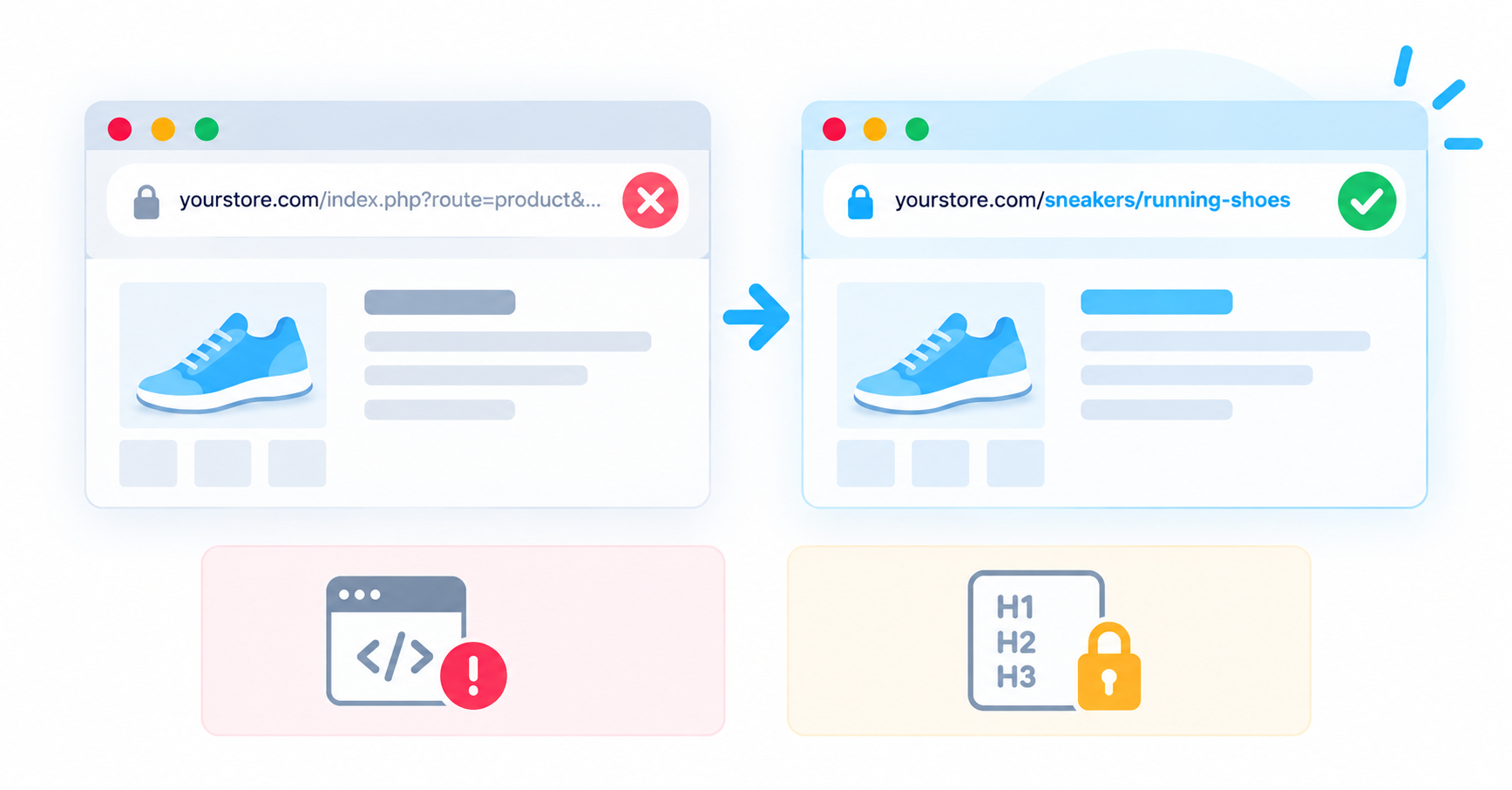
OpenCart generates canonical URLs for important page types, but ecommerce stores can still create multiple URL variations through categories, filters, pagination, and other parameters. Check that important product and category pages resolve to the canonical URLs you expect, particularly if you use a custom theme or extensions.
### No native structured data interface
OpenCart does not provide a centralized interface for managing Schema.org structured data. If you want more complete product, organization, breadcrumb, or other structured data, you may need an extension, theme customization, or manual implementation.
### Limited heading control
Heading tags are largely determined by your OpenCart theme rather than managed through a dedicated SEO interface. Depending on the theme, page templates may not always use H1, H2, and other heading levels in the way you expect. This makes choosing a well-built OpenCart theme important for SEO as well as design.
### Limited built-in social metadata management
OpenCart does not provide a comprehensive built-in interface for managing Open Graph metadata across your store. Depending on your theme and setup, additional implementation or an extension may be needed to control how products and pages appear when shared on social platforms.
### No centralized image alt-text workflow
Product images are important for ecommerce SEO, but OpenCart does not provide a centralized workflow for auditing and managing alt text across the entire store. Larger catalogs can therefore require more manual work or an extension.
### No native hreflang support
OpenCart supports multiple languages, but it does not automatically implement hreflang tags to tell search engines which language or regional version of a page should be shown to different users. For stores targeting several countries or languages, this is an important international SEO consideration.
## 3. How to Do SEO on an OpenCart Store
Once your store is set up, start with the SEO controls OpenCart already provides before adding extensions for functionality you actually need.
### Enable SEO-friendly URLs
OpenCart supports readable URLs, but you need to enable the relevant SEO URL settings and make sure URL rewriting is configured correctly on your server. Once enabled, create short, descriptive URL aliases for your important products, categories, and information pages instead of relying on parameter-heavy default URLs.
### Understand the OpenCart SEO keyword field
OpenCart has historically used the term "SEO keyword" for the URL alias or slug assigned to a page. It does not mean a target keyword that you want to rank for. For example, rather than using a product URL containing parameters, you could give the page a readable alias such as /waterproof-hiking-boots. The field controls the page's SEO-friendly URL, not what Google ranks the page for.
How to optimize keywords on an Opencart page
### Write unique titles and meta descriptions
Create unique metadata for your important product, category, and content pages where OpenCart provides the relevant fields. Use titles to describe the page clearly and naturally incorporate the primary search topic. Meta descriptions should accurately summarize what shoppers will find and give them a reason to click.
### Create and submit your XML sitemap
OpenCart provides built-in sitemap functionality. Enable the Google Sitemap feature in your OpenCart installation and submit the generated sitemap URL to Google Search Console. For multilingual stores or more complex sitemap requirements, you may need an additional solution.
### Optimize product and category content
Avoid using only short or duplicated manufacturer descriptions. Write useful product descriptions that answer customer questions and clearly explain important features and benefits. Category pages can also contain helpful introductory copy that explains the products available and gives search engines additional context about the page.
### Optimize your images
Use descriptive filenames where practical, compress large product images, and add meaningful alternative text where your implementation allows it. For stores with large catalogs, consider how you will manage image optimization consistently because OpenCart does not provide a centralized alt-text management workflow.
### Review your heading structure
Check the output of your active OpenCart theme to make sure important pages use a logical heading hierarchy. Your main page topic should be clearly represented and supporting sections should use appropriate lower-level headings.
### Build internal links
Link between related products, categories, buying guides, and other useful pages. Internal links help shoppers discover relevant products while giving search engines additional information about the structure and relationships between pages on your store.
Not sure which SEO improvements to prioritize? rankingCoach analyzes your OpenCart store and turns optimization opportunities into step-by-step tasks tailored to the platform.
**[See what to optimize next →](https://www.rankingcoach.com/en-us/seo)**
## 4. How to Track Your SEO Progress on OpenCart
OpenCart helps you configure parts of your store for search engines, but it does not provide the detailed organic search data needed to measure whether those changes are improving your rankings.
### Google Search Console
Connect your store to Google Search Console to monitor search queries, impressions, clicks, average positions, indexing issues, and crawl problems. Once your Google Sitemap feed is enabled, submit the sitemap URL through Search Console to help Google discover your important products and categories.
### Google Analytics
Use Google Analytics to understand what visitors do after reaching your store. Monitor organic landing pages, engagement, conversions, and revenue to see whether increased search visibility is attracting shoppers who actually convert.
### Keyword rankings
Search Console provides average position data, but dedicated rank tracking makes it easier to follow individual target keywords consistently over time. Track important product and category searches and focus on longer-term movement rather than individual daily fluctuations.
### Competitor performance
Your own traffic and ranking data only show part of the picture. Monitoring competing stores can help reveal keywords and search opportunities that you are currently missing.
rankingCoach combines keyword tracking and competitor insights with prioritized SEO recommendations, helping you understand both how your OpenCart store is performing and what to work on next.
**[Track your OpenCart SEO progress with rankingCoach →](https://www.rankingcoach.com/en-us/seo)**
## 5. How rankingCoach Helps OpenCart Users
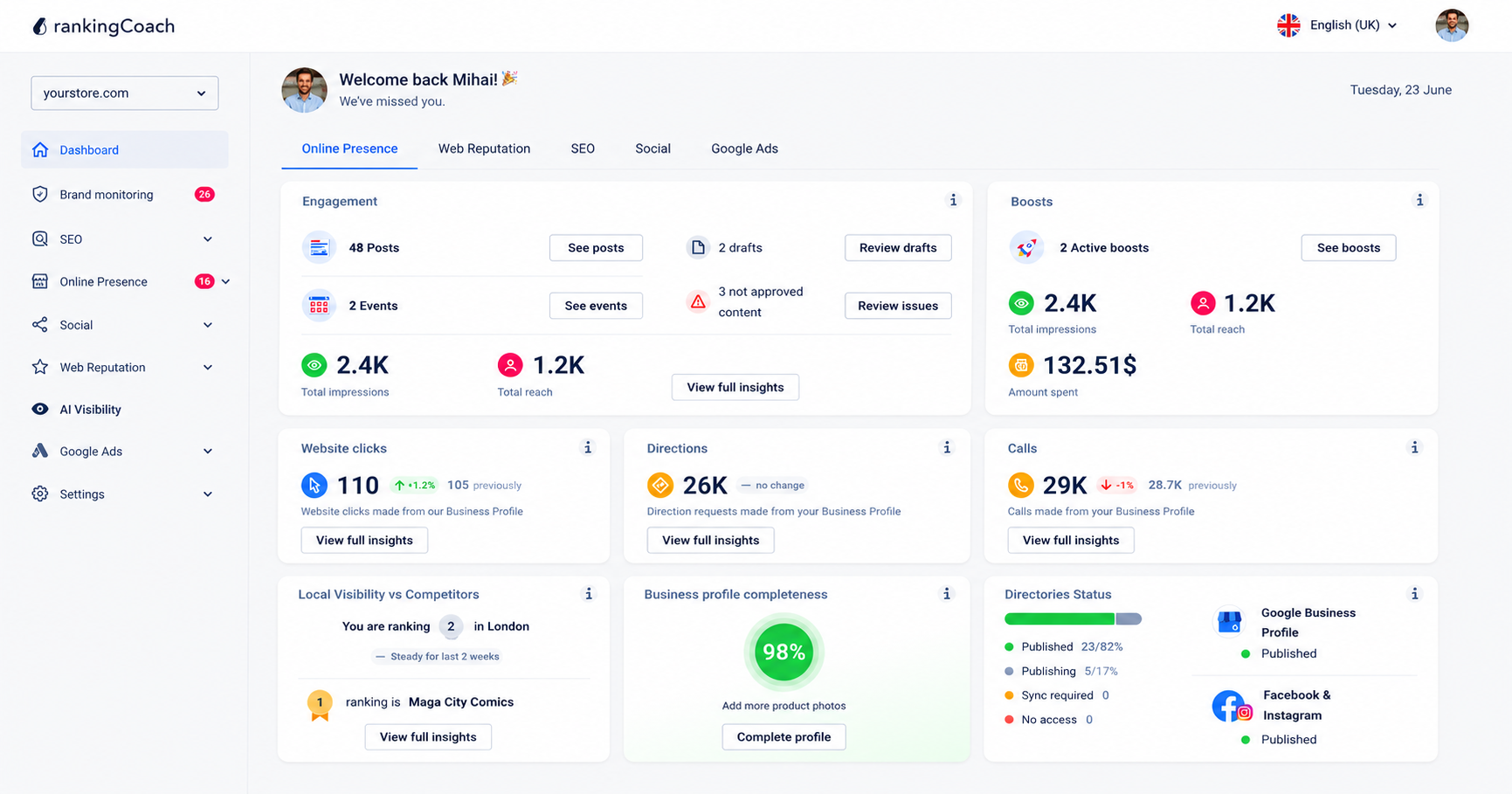
All major Content Management Systems (CMSs) are supported by rankingCoach, making your optimization plan the perfect fit for your system. To get started, create or sign in to your rankingCoach account and follow the onboarding process, selecting OpenCart as your CMS when prompted. rankingCoach then analyzes your store to identify SEO opportunities and create a personalized optimization plan.
Instead of simply presenting SEO data, rankingCoach turns its analysis into prioritized tasks. Each task includes written instructions and video tutorials tailored to OpenCart, helping you understand what needs improvement and where to make the change. This is particularly useful with OpenCart because the platform provides many of the basic SEO controls but leaves more advanced areas to extensions, themes, and manual configuration.
With rankingCoach 360, you can extend your work beyond SEO and manage other areas of your online visibility from the same platform.
### Key features for OpenCart users
- **Keyword rank tracking:** Monitor where your OpenCart store ranks for your target keywords and track movement over time.
- **Competitor monitoring:** See how your store compares with competitors in search results and identify keyword opportunities.
- **Business listings management:** Keep your business details accurate and consistent across Google, Bing, Facebook, and 30+ directories.
- **Review and reputation management:** Monitor customer reviews and respond efficiently with AI-assisted reply suggestions.
- **Social media and Google Ads:** Publish and schedule social content and manage Google Ads campaigns from one dashboard.
- **AI Visibility:** See how AI-powered search platforms such as ChatGPT, Perplexity, and Gemini represent your business and where visibility gaps exist.
- **AI Agent:** Automate routine SEO and marketing tasks across your digital presence.
**[Explore everything rankingCoach can do →](https://www.rankingcoach.com/en-us/features)**
## 6. OpenCart SEO: Frequently Asked Questions
**What is OpenCart?**
OpenCart is a free, open-source e-commerce platform for building and managing online stores. It provides tools for products, categories, orders, customers, payments, shipping, multiple stores, languages, and currencies, with additional functionality available through themes and extensions.
**Is OpenCart free?**
Yes. OpenCart's core software is open source and free to download and use. However, running an OpenCart store can still involve costs for web hosting, a domain, premium themes or extensions, development, maintenance, and other services.
**Does rankingCoach work with OpenCart?**
Yes. All major Content Management Systems (CMSs) are supported by rankingCoach, making your optimization plan the perfect fit for your system. To get started, create or sign in to your rankingCoach account and follow the onboarding process, selecting OpenCart as your CMS when prompted. rankingCoach then analyzes your store to identify SEO opportunities and create a personalized optimization plan.
**How rankingCoach Helps with OpenCart SEO?**
rankingCoach analyzes your store, tracks keyword rankings, monitors competitors, and turns SEO opportunities into prioritized tasks. Each task includes step-by-step guidance tailored to OpenCart, helping you understand what to optimize and where to make the changes.
**Is rankingCoach free for OpenCart users?**
Yes. rankingCoach offers a free plan with core SEO and visibility features. Paid plans provide access to additional functionality and marketing tools. You do not need to install an OpenCart extension to get started.
## 7. Get Started with rankingCoach
OpenCart gives you useful SEO controls, but improving search visibility still requires knowing what to prioritize. rankingCoach analyzes your store and turns SEO opportunities into a clear action plan, helping you focus on the changes that can make the biggest difference.
rankingCoach works alongside OpenCart without requiring a native OpenCart extension. To get started, create or sign in to your rankingCoach account and follow the onboarding process, selecting OpenCart as your CMS when prompted. rankingCoach then analyzes your store to identify SEO opportunities and create a personalized optimization plan.
Whether you want to improve existing rankings, discover new keyword opportunities, or understand how your store compares with competitors, rankingCoach gives you the guidance and tracking tools to keep moving forward.
**[Start improving your Google rankings →](https://www.rankingcoach.com/en-us/seo)**
- - Features
- [Local Marketing](https://www.rankingcoach.com/en-us/local-marketing?utm_source=rc_blog)
- [Google Ads](https://www.rankingcoach.com/en-us/google-ads?utm_source=rc_blog)
- [Search Engine Optimization (SEO)](https://www.rankingcoach.com/en-us/seo?utm_source=rc_blog)
- [Reputation management](https://www.rankingcoach.com/en-us/local-marketing?utm_source=rc_blog)
- [Social Media Monitoring](https://www.rankingcoach.com/en-us/features?utm_source=rc_blog)
- [Brand Monitoring](https://www.rankingcoach.com/en-us/features?utm_source=rc_blog)
- - About
- [Legal Notice](https://www.rankingcoach.com/en-us/legal-notice?utm_source=rc_blog)
- [Terms and Conditions](https://www.rankingcoach.com/en-us/terms-and-conditions?utm_source=rc_blog)
- [Privacy Policy](https://www.rankingcoach.com/en-us/privacy-policy?utm_source=rc_blog)
- [Cancellation and Refund](https://www.rankingcoach.com/en-us/cancellation-refund-policy)
- [About Us](https://www.rankingcoach.com/en-us/about-us?utm_source=rc_blog)
- [Glossary](https://knowledge.rankingcoach.com/en)
- [Press](https://go.rankingcoach.com/en/pr)
- [Privacy & Cookie Settings](https://www.rankingcoach.com/en-us#)
- - Help
- [Help Center](https://help.rankingcoach.com/en?utm_source=rc_blog)
- [Contact](https://www.rankingcoach.com/en-us/contact?utm_source=rc_blog)
- Careers
- [We are hiring](https://www.linkedin.com/company/rankingcoach/jobs/?utm_source=rc_blog)
- - Digital Marketing Guides
- [Search Engine Marketing](https://www.rankingcoach.com/en-us/search-engine-marketing)
- [Search Engine Optimization](https://www.rankingcoach.com/en-us/search-engine-optimization)
- [Social Media Marketing](https://www.rankingcoach.com/en-us/social-media-marketing)
- [Email Marketing](https://www.rankingcoach.com/en-us/email-marketing)
- [User Experience (UX)](https://www.rankingcoach.com/en-us/user-experience-in-digital-marketing)
- [Review Management](https://www.rankingcoach.com/en-us/review-management)
- - rankingCoach is specially tailored for the following CMSs:
- [WordPress](https://go.rankingcoach.com/en/cms/seo-digital-marketing-wordpress)
- [Drupal](https://go.rankingcoach.com/en/cms/seo-digital-marketing-drupal)
- [Joomla 3.2](https://go.rankingcoach.com/en/cms/seo-digital-marketing-joomla)
- [Magento](https://go.rankingcoach.com/en/cms/seo-digital-marketing-magento)
- [Shopify](https://go.rankingcoach.com/en/cms/seo-digital-marketing-shopify)
- [Squarespace](https://go.rankingcoach.com/en/cms/seo-digital-marketing-squarespace)
- [Webs](https://go.rankingcoach.com/en/cms/seo-digital-marketing-webs)
- [Wix](https://go.rankingcoach.com/en/cms/seo-digital-marketing-wix)
- [Weebly](https://go.rankingcoach.com/en/cms/seo-digital-marketing-weebly)
- [Duda](https://go.rankingcoach.com/en/cms/seo-digital-marketing-duda)
- [PrestaShop 1.6](https://go.rankingcoach.com/en/cms/seo-digital-marketing-prestashop)
- [1&1 MyWebsite](https://go.rankingcoach.com/en/cms/seo-digital-marketing-11-mywebsite)
- [Jimdo](https://go.rankingcoach.com/en/cms/seo-digital-marketing-jimdo)
- [Opencart](https://go.rankingcoach.com/en/cms/seo-digital-marketing-opencart)

-
-
-
```json
{
"@context" : "https://schema.org",
"@type" : "VideoObject",
"contentUrl" : "https://8411010.fs1.hubspotusercontent-eu1.net/hubfs/8411010/video_assets/476275602631/inherited/web_optimized.mp4",
"dateModified" : "2026-09-22T14:04:03.326Z",
"description" : "See how to optimize keywords for clearer content and SEO.",
"duration" : "PT1M2.4S",
"height" : 720,
"name" : "Optimizing keywords on an Opencart page",
"thumbnailUrl" : "https://8411010.fs1.hubspotusercontent-eu1.net/hubfs/8411010/optimizing-keywords-on-an-opencart-page.mp4/medium.jpg",
"uploadDate" : "2026-09-22T14:02:50.242Z",
"width" : 1280
}
```
```json
{
"@context" : "https://schema.org",
"@type" : "FAQPage",
"mainEntity" : [ {
"@type" : "Question",
"acceptedAnswer" : {
"@type" : "Answer",
"text" : "In OpenCart, the SEO keyword field refers to the URL alias or slug used to create a search-engine-friendly URL. For example, you could use running-shoes to create a cleaner product URL instead of a URL containing parameters. It does not tell Google which keyword you want the page to rank for."
},
"name" : "What is SEO keyword in OpenCart?"
}, {
"@type" : "Question",
"acceptedAnswer" : {
"@type" : "Answer",
"text" : "OpenCart is a free, open-source ecommerce platform for building and managing online stores. It provides tools for products, categories, orders, customers, payments, shipping, multiple stores, languages, and currencies, with additional functionality available through themes and extensions."
},
"name" : "What is OpenCart?"
}, {
"@type" : "Question",
"acceptedAnswer" : {
"@type" : "Answer",
"text" : "Yes. OpenCart's core software is open source and free to download and use. However, running an OpenCart store can still involve costs for web hosting, a domain, premium themes or extensions, development, maintenance, and other services."
},
"name" : "Is OpenCart free?"
}, {
"@type" : "Question",
"acceptedAnswer" : {
"@type" : "Answer",
"text" : "Yes. rankingCoach works alongside OpenCart without requiring a native OpenCart extension. To get started, create or sign in to your rankingCoach account and follow the onboarding process, selecting OpenCart as your CMS when prompted. rankingCoach then analyzes your store to identify SEO opportunities and create a personalized optimization plan."
},
"name" : "Does rankingCoach work with OpenCart?"
}, {
"@type" : "Question",
"acceptedAnswer" : {
"@type" : "Answer",
"text" : "rankingCoach analyzes your store, tracks keyword rankings, monitors competitors, and turns SEO opportunities into prioritized tasks. Each task includes step-by-step guidance tailored to OpenCart, helping you understand what to optimize and where to make the changes."
},
"name" : "What does rankingCoach do for OpenCart SEO?"
}, {
"@type" : "Question",
"acceptedAnswer" : {
"@type" : "Answer",
"text" : "Yes. rankingCoach offers a free plan with core SEO and visibility features. Paid plans provide access to additional functionality and marketing tools. You do not need to install an OpenCart extension to get started."
},
"name" : "Is rankingCoach free for OpenCart users?"
} ]
}
```
```json
{
"@context" : "https://schema.org",
"@type" : "SoftwareApplication",
"applicationCategory" : "BusinessApplication",
"name" : "rankingCoach",
"operatingSystem" : "Web"
}
```